You can change, add, or delete email addresses linked to your ID.me Wallet at any time. This article explains how to update your email address, set a primary email, and fix common email issues.
Add a new email address
- Sign in to your ID.me Wallet.
- From My Wallet, select Manage Profile.
- Select Add an email.
- Enter an email address you own, and select whether it is your personal or work email.
-
Select Send confirmation. A confirmation message will be sent to the newly added email address.
Tip: If you don't receive the email, check your spam folder. You can resend the verification if needed. - To finish adding your new email address, select the link in the confirmation email.
Change your primary email
Your primary email address receives important messages about verification and any ID.me marketing emails (if subscribed). By default, the email used to create your wallet is set as the primary email. If you have multiple email addresses, you can change which one is primary.
To set a primary email:
- Sign into your ID.me Wallet and select Manage Profile.
- Under “Email”, find the email you’d like to set as primary.
- Select the three dots next to the email and select Set as primary.
Mark an email as personal or work
You can mark emails on your wallet as either personal or work:
- Sign into your ID.me Wallet and select Manage Profile.
- Under “Email”, find the email you want to label.
- Select the three dots next to the email, then select Edit.
- Check the box next to “Work”, “Personal”, or both.
Remove or delete an email
You can remove an email address from your wallet by deleting it. However, you must change your primary email before deleting a primary address. To delete a non-primary email:
- Sign into your ID.me Wallet and select Manage Profile.
- Under “Email,” find the email you want to delete.
- Select the three dots and select Delete, then confirm by selecting Remove.
To delete a primary email:
- Add a new email address to your wallet.
- Set the new email as your primary.
- Next to the email you want to delete, select the three dots.
- Select Delete, then confirm by selecting Remove.
Fix problems adding your email
My email is associated with another wallet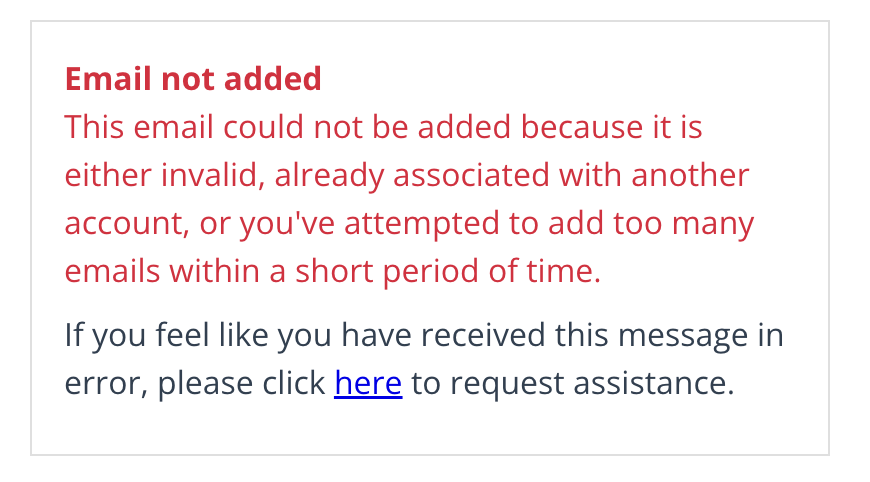
If you're unable to add an email because it’s associated with another wallet, follow the steps in Close a duplicate ID.me Wallet to reuse your email.
If you received the error above but don’t have another wallet, Contact ID.me Support.
I can’t confirm my email address
You’ll need to confirm your email to add it to your wallet. If you have trouble confirming it, visit Confirming your email address.